Architecture and practice
I Added Four Essential Agent Components to DeepSeek Harness — DSH Plugin Best Practices
· OpenMA
TL;DR
- Plugin lets new Agent capabilities grow out of the community without waiting for the next core release.
- What makes DSH Plugin different is that it does more than compose Plugins: an Agent may also inherit capabilities along a Scope parent chain. Reuse becomes easier, while the development model, implicit dependencies, and same-name shadowing become harder to reason about.
- Plugin is a useful unit for developers who split capabilities. For users, Preset provides a higher-level unit for selecting a complete capability set. AgentPreset composes an Agent's capabilities and configuration; PermissionPreset composes a set of execution policies.
- A good Plugin should both plug in and be plugged into.
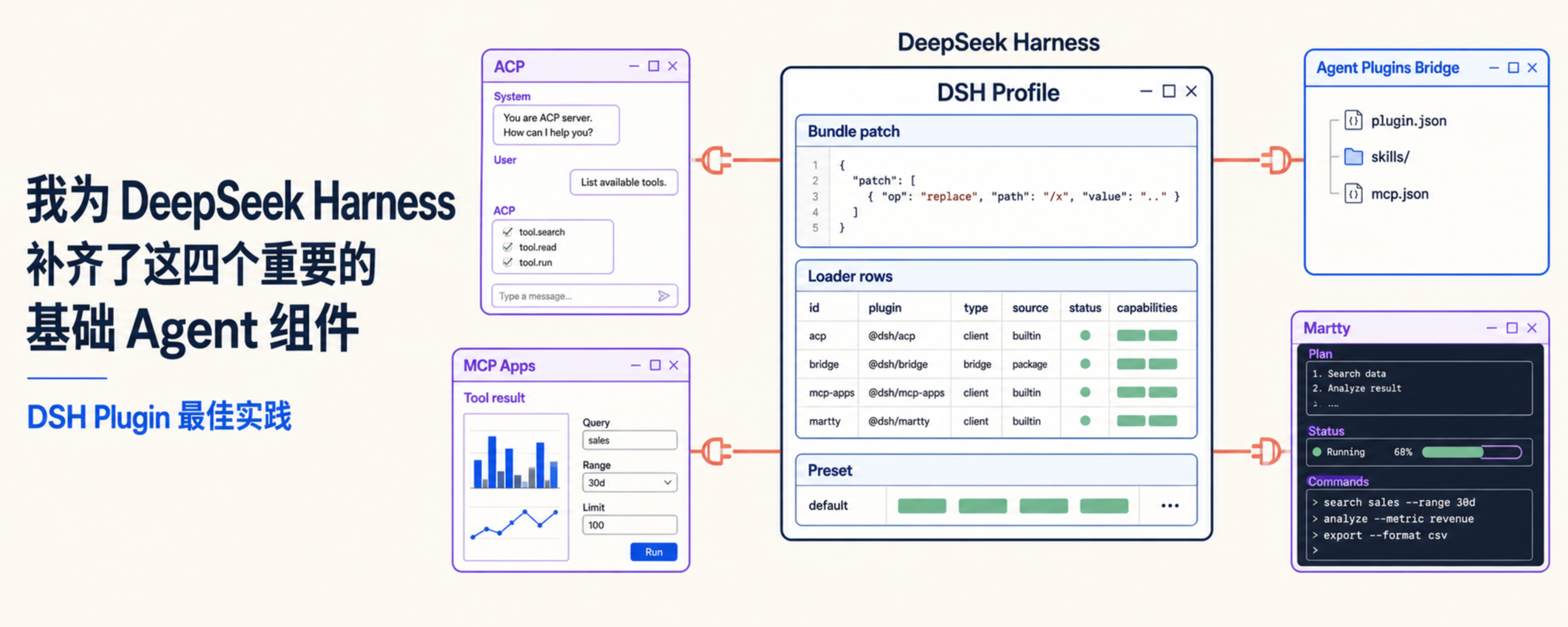
Over the past week, I built four Plugins around DeepSeek Harness:
- Martty: a TUI Plugin and an ACP Client that can connect to DSH or another ACP Agent. It also exposes extension points for themes, commands, panels, and dynamic Cordis Client Plugins. It can be plugged in, and it lets others plug into it.
GitHub: https://github.com/openma-ai/Martty - DeepSeek Harness ACP: makes DSH available to ACP Clients such as Zed and terminal interfaces.
GitHub: https://github.com/openma-ai/deepseek-harness-acp - DSH Agent Plugins Bridge: converts Agent Plugins, Codex, Claude Code, and Pi Plugins into capabilities DSH can manage.
GitHub: https://github.com/openma-ai/dsh-agents-plugins - DSH MCP Apps: completes MCP Apps on top of DSH's existing MCP support, so a Tool can deliver an interactive interface.
GitHub: https://github.com/openma-ai/dsh-mcp-apps
In retrospect, these four projects pushed the same Plugin mechanism across four different boundaries. DeepSeek Harness ACP translates DSH Sessions, Tools, and permissions into ACP messages, so Clients such as Zed and Martty can connect directly to DSH. DSH Agent Plugins Bridge turns Plugins from other Agent ecosystems into capabilities DSH can manage. DSH MCP Apps adds the application layer missing from the existing MCP support. Martty makes the TUI Plugin itself an extensible component.
Those boundaries look unrelated, yet inside Harness they repeatedly raise the same questions: how a Plugin declares dependencies, how a package enters a Profile, how the Loader creates a Fiber, why Web owns a separate Client tree, how dynamic code follows the same lifecycle, and how Preset turns a group of Plugins into a selectable Agent. The community can use these official abstractions to add Agent capabilities without putting every capability into the Harness core.
We will begin with a minimal Plugin, follow its loading path into external ecosystems, Web, dynamic Plugins, and Presets, then return to the reusable practices these four projects revealed.
Start with the most basic Plugin
The stdio transport in DeepSeek Harness ACP is almost the smallest possible DSH Plugin:
export const inject = ['acpServer']

export function apply(ctx) {
  const stream = nodeAcpStream(process.stdin, process.stdout)
  return ctx.acpServer.connect(stream)
}
This module does only two things:
injectdeclares that it needsacpServer.apply(ctx)receives a Context whose dependencies are satisfied and connects a stdio stream to the Service.
These few lines already contain the basic principle of “plugging in.” The Plugin does not search for a global ACP Server, nor does it create a second Harness. It waits for the Host to provide a Service, then connects a transport to it. The resulting runtime resource is owned by a Fiber and is reclaimed according to ownership when the parent exits. Events, timers, and registry contributions are commonly paired with cleanup through ctx.effect(); they follow the same lifecycle.
For DSH to discover this module, the package also declares its Bundle patch:
{
  "dsh": { "bundle": { "patch": "./cordis.patch.yml" } }
}
The patch then writes the module as a Loader row:
- insert:
    - id: acp-bridge
      name: '@openma/deepseek-harness-acp/stdio'
The TypeScript module defines the Plugin's shape. package.json tells DSH where to find the composition declaration. The Bundle patch decides where the Plugin enters the profile. Together, these three pieces form a minimal, installable DSH Plugin.
A qualified Plugin therefore needs four properties:
- Dependencies can be declared:
injectnames the required Services and forms an explicit dependency graph. - Capabilities can be composed: the Plugin contributes through Context, without adding a special branch to the Host.
- Instances can be isolated: each configured instance is owned by an independent Fiber.
- The lifecycle is reversible: disabling the Plugin fully removes its connections, events, and UI contributions.
The Host does not need to understand a Plugin's business logic to load, manage, and unload it through the same mechanism.
How installation becomes a running capability
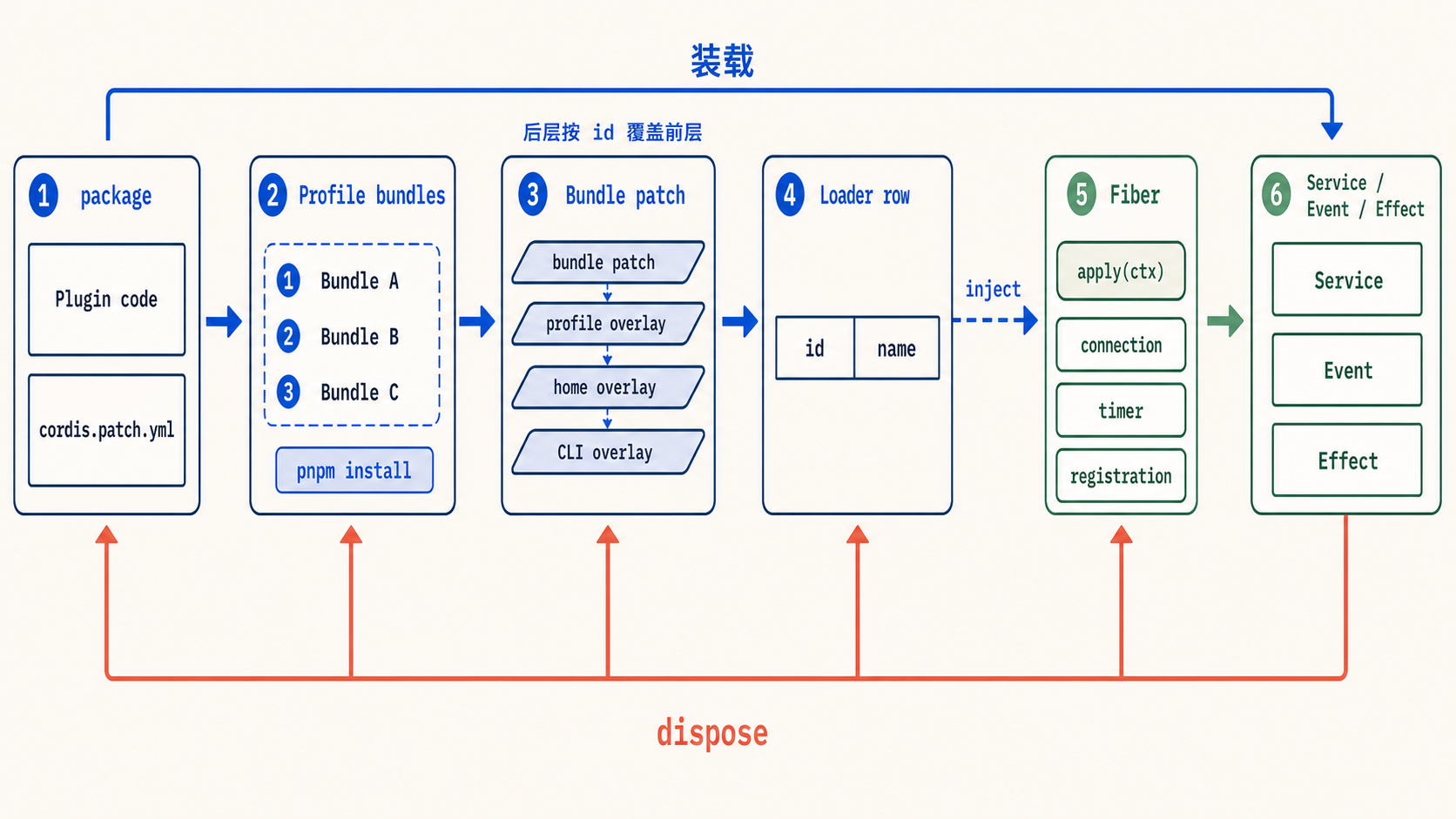
The DSH loading path can be reduced to five layers:
Profile
  └─ ordered Bundle patch layers
       └─ Loader rows
            └─ Cordis Fibers
                 └─ Services / Events / Effects
Profile decides which capabilities a DSH instance composes. dsh plugin --profile acp add ... asks pnpm to install the package into the profile and appends the Bundle name to the dsh.profile.bundles list in package.json.
Bundle patch is the declarative composition layer. Patch priority comes from this bundles list, not from pnpm's dependency graph or lockfile order. DSH applies each Bundle patch, then the profile, home, and command-line overlays. A later layer may replace an earlier Loader row by id. --dump-config shows the final composition.
Loader row represents a manageable Plugin instance. Its position in a configuration array does not express runtime dependency order: the Loader may mount rows concurrently, while each Plugin waits for required Services through inject. The Loader creates a Fiber for the row, waits for dependencies, then calls apply. Services, events, and effects registered by the Plugin belong to that Fiber. Disabling the row disposes the Fiber and retracts each contribution along the same path.
This separates “the npm package is installed” from “the capability is running.” A package delivers code, a Bundle decides where it is composed, a Loader creates an instance, and a Fiber owns runtime resources.
The evolution of DeepSeek Harness ACP made this boundary progressively clearer. Initially it behaved more like a standalone adapter with its own boot logic: locate Harness, create a Session, occupy stdio, and translate messages in both directions. That worked in isolation. But once the same adapter needed to enter Zed, Martty, or an existing profile, starting another Host would duplicate credentials, Sessions, Tools, and persistence.
Later changes removed special branches from the launcher. ACP Host became an embeddable Plugin, while stdio, the TUI Client bridge, and user questions became separate child Plugins. Host provides Services such as agents, commands, and approval; ACP only projects them into the protocol. When a Client leaves, only resources belonging to that connection are reclaimed, without affecting other Harness Sessions. This history gives us a first test: an integration that merely runs is not enough. A good integration must enter someone else's composition and return every resource it owns.
Composition and inheritance: what makes DSH Plugin different
Codex, Claude Code, Pi, and Agent Plugins all call their extensions Plugins, but the word does not have one shared runtime meaning. Each ecosystem decides where packages are discovered, what a manifest may declare, and which extension point executes the code. A DSH Plugin enters a Cordis composition: a Bundle patch inserts Loader rows into the current Profile, then each Plugin contributes capabilities through Services.
The Agent Plugins standard adds a portable package format across those ecosystems. It describes a Plugin with plugin.json and carries standard capabilities through skills/ and mcp.json. Its primary question is “how can different Agents recognize the same Plugin package?” DSH continues with another question: “once the package's capabilities enter a runtime, how do they depend on one another, and who owns them?”
Most Agent Plugin systems begin with package contents: put Skills, MCP, Hooks, and related capabilities into one package, then compose that content into an Agent at installation time. The DSH runtime also manages two structural relationships. inject determines which Service a Plugin waits for. The Fiber parent tree determines who owns a resource and which parent it exits with. For registries that support Scope—such as Tools, Skills, and prompt sections—an Agent may also search along an agent → preset → global parent chain. Ordinary Services do not use this Scope chain; they continue to resolve through Context, realm, and inject.
This capability inheritance is almost isomorphic to inheritance in programming languages. Shared Tools, Skills, and Prompts are reusable; the costs are equally familiar: implicit dependencies, coupling to a parent, and same-name shadowing. Inspecting only the current composition may not reveal an Agent's effective capabilities; sometimes you must walk up the Scope parent chain. Composition is a better fit for optional and volatile capabilities. Inheritance is a better fit for a stable base.
inject is also a deliberately weak dependency declaration. It names the required Service, but it does not bind that Service to a particular Plugin, provider version, or Scope. The dependency graph closes only inside a concrete composition. That freedom allows implementations to be replaced and Plugins to be recombined, but missing dependencies, provider conflicts, and version incompatibilities appear later.
The user gains many more extension points: protocols, Tools, Agent compositions, backend connections, Web slots, and Client Surfaces may all be supplied by the community. They can be enabled separately and fail locally. The cost lands on development and governance: authors need to understand Bundles, Loaders, Services, and Fibers; the more open the ecosystem becomes, the more Plugin quality can diverge in cleanup, error handling, UI, permissions, and upgrades.
An external Plugin therefore cannot be integrated by simply renaming its manifest. A Skill must enter the Skill Service, an MCP Server must become an MCP Client row, and Hooks and Agents must find the registration point that owns them.
Harness core provides stable Context, Service, Loader, and Fiber mechanisms, while new formats and capabilities grow in community Plugins. This resembles an engineering projection of the Bitter Lesson into Plugin systems: instead of having the core team enumerate every capability, first provide a general mechanism that can receive unknown extensions.
Agent Plugins Bridge performs this translation for the existing Harness Plugin ecosystem. It uses Agent Plugins 1.0 as the portable core specification and adds compatibility adapters for Codex, Claude Code, and Pi. Discovery is read-only; only an explicit Import copies content into the current Profile; Activation then materializes each capability as Loader rows.
Web Plugin: Host, Client, and two-sided Plugins
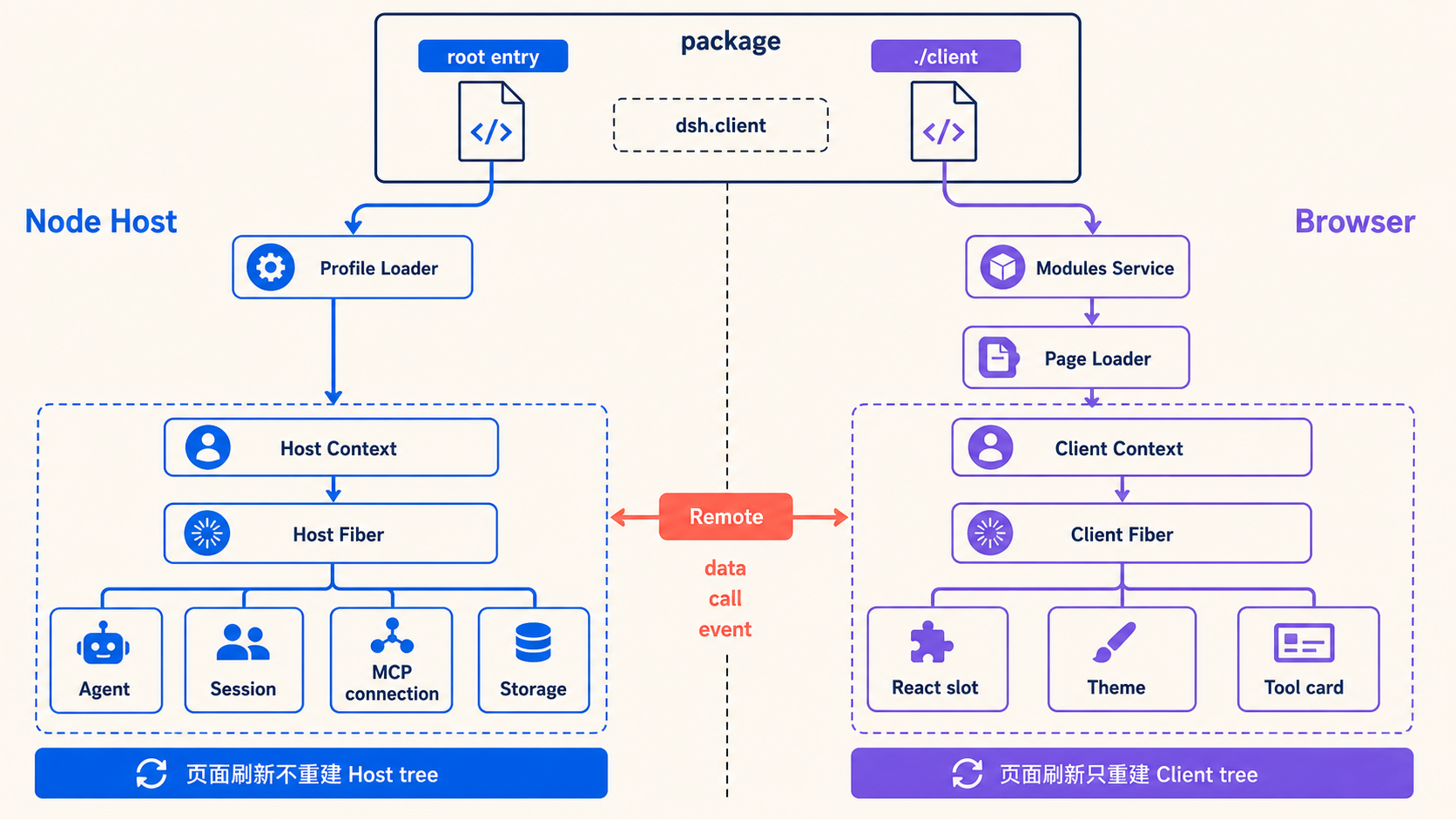
The official Web runtime contains two independent Cordis trees. One runs in the Node Host and owns Agents, Sessions, and backend Services. The other runs in the browser and owns React, page slots, themes, and interaction state. Settings pages, Tool cards, themes, and other UI contributions visible on the Web all come from Client Plugins in the browser tree. The trees do not share Contexts, Fibers, or object references.
According to where code actually runs, there are three forms:
- Host Plugin runs only in Node. It provides Agents, connections, storage, permissions, or other backend Services, without producing browser UI.
- Client Plugin runs only in the browser Cordis tree and contributes slots, themes, or interaction state. Its package still needs a Host row for Modules Service discovery, but the Host entry may be empty.
- Two-sided Plugin delivers a Host half and a Client half in one installation unit. The Host half owns data and resources, the Client half presents them, and Remote carries explicit data, calls, and events between the two.
All three forms still have dependency and ownership layers. The Host and Client trees each own their own inject dependency graph and Fiber ownership graph. Remote connects the two hierarchies; it does not merge them into one tree.
A two-sided Plugin contains two Plugin instances. The package root entry is mounted into the Host by the profile Loader. dsh.client in the manifest declares browser dependencies, while ./client exports the Client Plugin. Host Modules Service scans enabled rows and creates the browser module graph; the page Loader then creates a separate Fiber for the Client half. “Two-sided” means that one installation unit spans both ends and data can travel in both directions. It does not mean that one Fiber or Context spans two processes.
The same package name does not imply the same Plugin instance. Host row and browser row own different Contexts and Fibers. A page refresh only rebuilds the Client tree, so Host connections, tasks, and listeners may continue running. Conversely, unloading a Host Plugin does not cross a process boundary and directly destroy a Client Fiber already open in a page; the page receives a new module graph after refresh or recomposition. Web UI is one presentation of a Host capability, not the owner of backend resource lifecycles.
DSH MCP Apps is a two-sided Plugin. The DSH version we began with already used dsh-mcp-client for MCP connections, Tool discovery, and execution, but it did not yet support MCP Apps. Apps must read a ui:// Resource from a Tool definition's _meta, load the interface content, establish AppBridge, and safely run HTML provided by the Server.
The package delivers both Host and Client Bundles. Host reuses the existing MCP connection. Client takes over the corresponding Tool result slot and places the App in an iframe sandbox; user interaction travels back to Host through Remote. AppBridge and the sandbox provide a dedicated App presentation path, while both halves remain ordinary Loader-managed Plugins and no second MCP connection is created. A TUI can continue to use the same MCP Tools and Resources without executing the browser HTML.
Dynamic Cordis Plugins in Creator mode: self-evolving
Dynamic Plugins solve a different problem: code does not need to exist in the Profile in advance. An Agent can keep adding Plugins to itself while it is running.
cordis_define validates and registers code, leaving a new immutable version after every change. cordis_run loads it. Stop retracts the running instance; delete removes the definition and every version.
A dynamic Plugin still follows the loading rules of a static Plugin. Web's cordis-client-runner converts runtime code into an ordinary Loader entry, so the Plugin still waits through inject, activates through apply, and cleans up through a disposer. The running Plugin joins the ownership hierarchy as a child Fiber under Runner and joins the dependency hierarchy through Services. Only the code source and the time it enters the Loader have changed. Dependency and ownership rules are not replaced.
Separating define from run means definition only records a version; running crosses the trust boundary and creates a Fiber and side effects. A failed experiment can append another version and switch. The official implementation deliberately keeps definitions in Host process memory. Refreshing a page only reconstructs the Client tree, so saved definitions remain; restarting the Host process loses them. A result intended for long-term use should be saved as an ordinary package, returning installation, versioning, and removal to the static Plugin workflow.
Dynamic Plugins can run outside Web as well. A Host-only Plugin can run in a headless or ACP environment that provides a Host Runner. A Plugin with a Client half needs a Surface that provides the corresponding Runner. Official Web presents it with React and page slots; Martty presents it with TuiNode and terminal Services.
Preset: decide which capabilities an Agent brings into the runtime
A Plugin package may compose several capabilities, while DSH adds dependencies and inheritance between them. But capabilities installed in the environment are not necessarily capabilities every Agent should receive. Preset moves composition to the Agent layer: it gives a name to a coordinated group of choices, then assigns that group to a concrete Agent.
A dynamic Plugin Host Runner may always be present in the environment, yet an ordinary Agent may not see the Tool that controls it. The official cordis AgentPreset adds tool-cordis and a supporting Skill to a complete composition. That Agent can inspect the Cordis API, define and run Plugins, and continue editing after a loading error.
The Cordis dynamic Plugin experience in official Web therefore has three parts: static cordis-client-runner loads code, static ui-cordis provides approval and management UI, and the cordis AgentPreset makes the Agent the author. Plugin runtime provides the capability; AgentPreset decides which kind of Agent can use it. Switching back to standard leaves the Host infrastructure running, but the current Agent no longer owns those authoring Tools.
Once a system exposes prompt, Tool, Skill, model, sandbox, and approval choices, arbitrary combinations quickly produce many untested states. Preset groups decisions that should move together into a named, reusable plan and makes three things explicit:
- Consistency: the complete combination expresses one intent.
- Coordination boundary: which choices change together and how each failure is handled.
- Effective time: when the choice becomes fixed and which later state depends on it.
AgentPreset goes deeper than ordinary composition. It turns a composition into an inheritable standing Scope. Selecting a Preset is equivalent to selecting the Agent's capability parent. PermissionPreset merely combines two policy values and does not establish a new Scope inheritance relation. Their names are similar, but one creates a capability hierarchy while the other provides an operational shortcut.
AgentPreset implements each Preset directly as a Scope. In the official implementation, every Preset is a directory with an agent.cordis.yml file containing ordinary Loader rows. Roster mounts that composition as a standing Scope; when an Agent is created, its Scope is attached below the Preset Scope. Registries that support Scope—Tools, Skills, and prompt sections—therefore resolve through agent → preset → global. A Preset may include or omit prompts, Tools, Skills, models, and compaction. For example, minimal keeps only a few basic Tools and includes neither Skills nor compaction. Plugin instances may be shared while Session- or Agent-keyed state remains isolated.
The “fragile base class” problem in programming languages becomes the “fragile Preset” problem here. An Agent's effective capabilities come from the full parent chain, so the Session alone is insufficient. Changing a parent Preset affects Agents attached later, while a same-name Tool in a child may shadow the parent version. The official runtime therefore pins a running Agent to the mounted composition generation. New Sessions may use a later Preset file; old Sessions keep the interpretation environment they were created with. This time boundary prevents reuse from breaking reproducibility.
AgentPreset is therefore heavier than a configuration template. It stores a capability topology: which Tool schemas the model sees on the first turn, which prompt sections enter the prefix, where Skills are discovered, and how compaction participates in long history. Once a conversation begins, this topology becomes the interpretation environment for its history. Official recompose() is consequently limited to a blank Agent. It first ensures the new composition is mounted, then moves the Agent Scope; on failure, the old binding remains. A Session with output is locked because its history may contain Tool calls the new Preset cannot explain or execute.
PermissionPreset is instead a policy table. A name maps to two independently consumed settings, sandbox/mode and approval/policy, such as workspace-write + ask or danger-full-access + never. Switching records the named choice, then updates the values consumed by the executor and approval service. This path does not have AgentPreset recompose's transactional rollback. If a user edits both settings independently and the result matches no named combination, the UI derives custom. PermissionPreset constrains how the next Tool runs; it does not rewrite the Agent's Tool view or the semantics of its history.
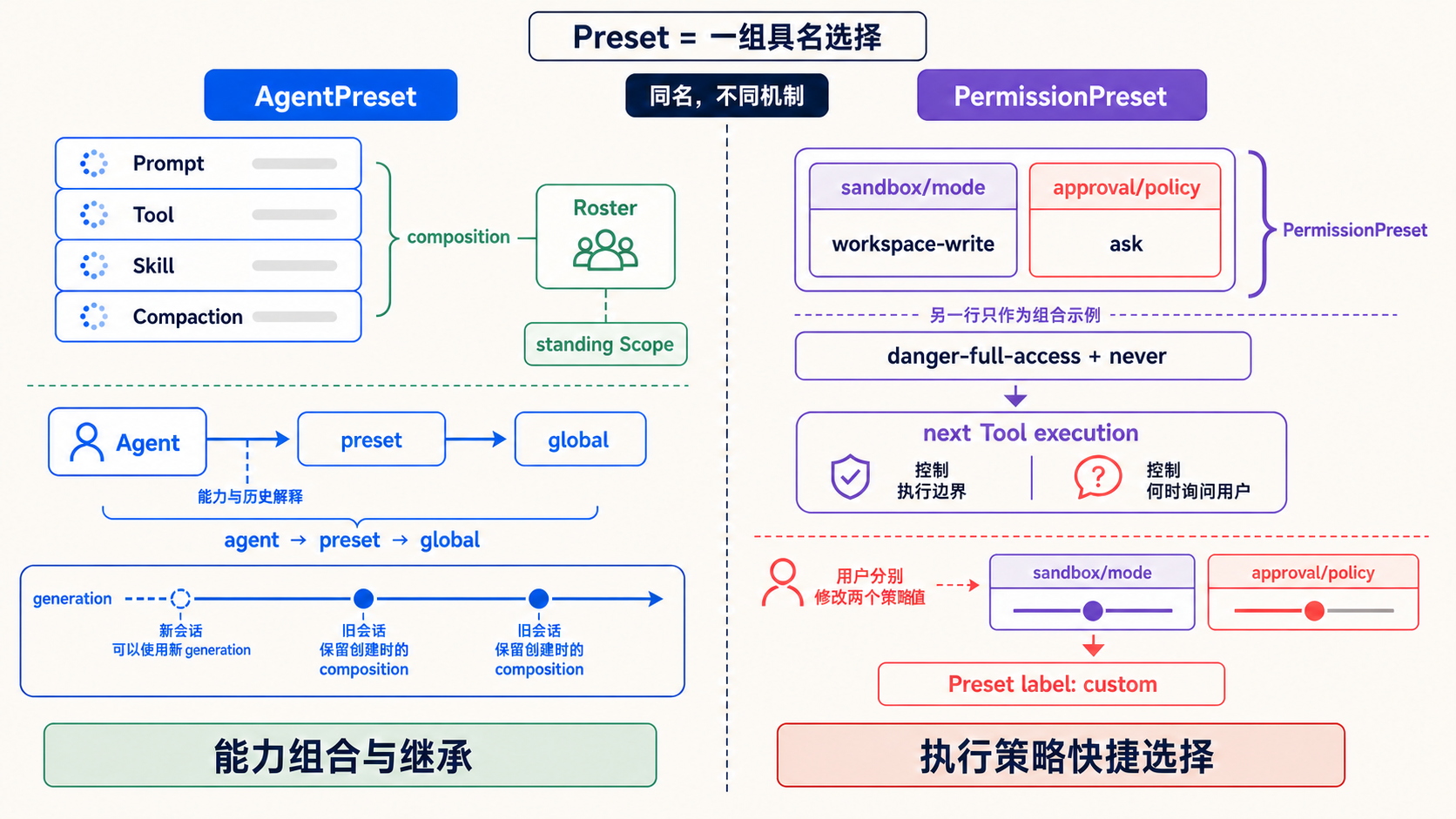
They share only the Preset idea: group decisions that can drift out of sync into one user intention and define when it becomes effective. The name Preset does not itself guarantee transaction semantics. AgentPreset answers “who is this Agent, and what can it do?” PermissionPreset answers “how far may it go next, and when must it ask a human?”
Do not merely plug in—be plugged into: the Martty example
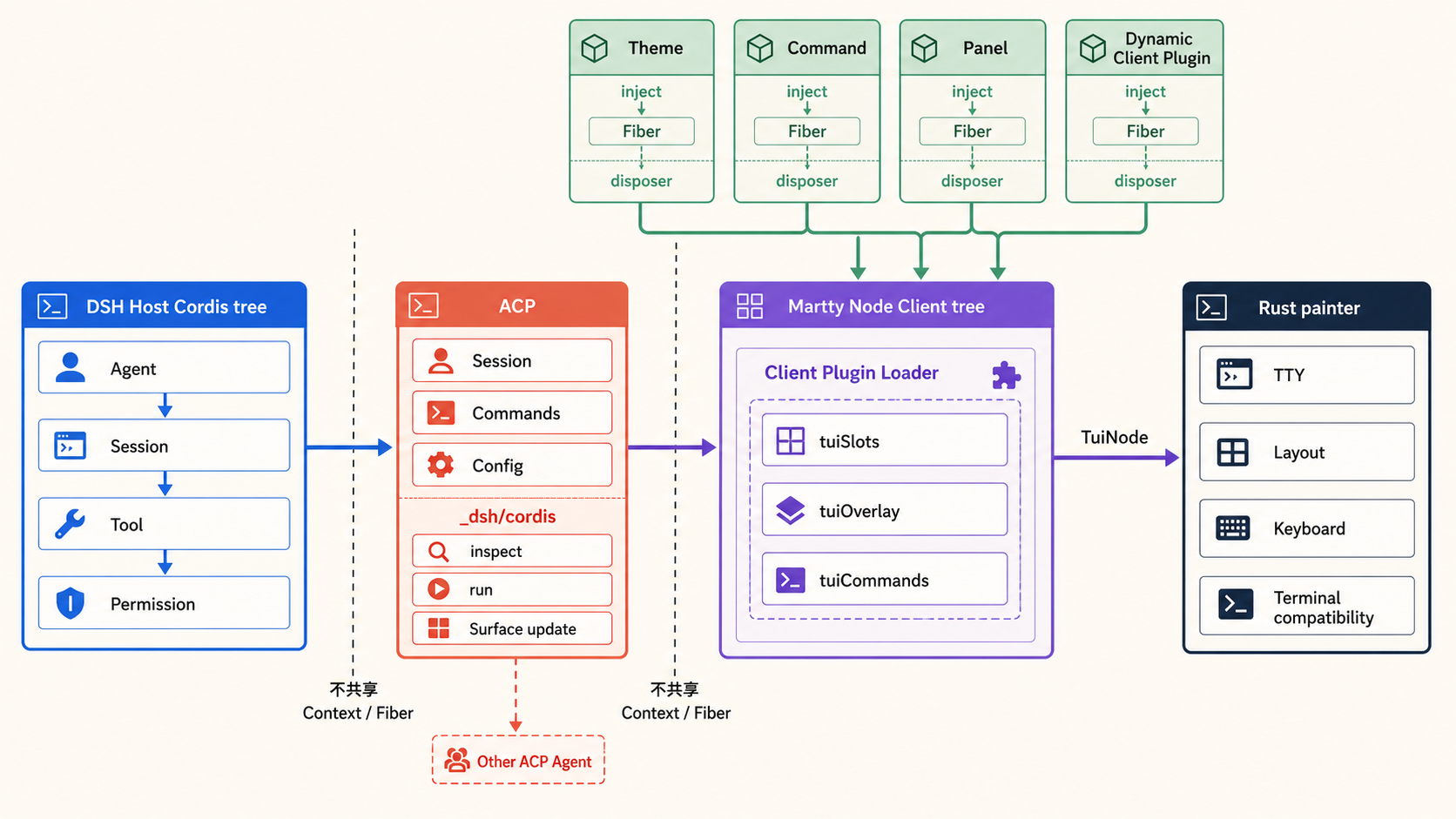
Martty's architecture was directly inspired by the official Web two-tree model. We kept DSH's Host Cordis tree and started a separate Node Client tree, connecting them with ACP. Rust owns only the TTY, input, and painting; it does not copy an Agent runtime. The Web React renderer can therefore be replaced by a semantic terminal renderer while Plugin dependencies, Fibers, and lifecycles remain intact.
This architecture was not complete from the beginning. The early terminal program directly owned colors, the status bar, the plan view, and Session state. Features grew quickly, but every new UI capability taught the Rust main loop another domain concept. Looking back through later changes, Plan and statistics first moved into Client Plugins, the welcome page became slot contributions, then UI Presets, theme packages, and persistent local Plugin lifecycles arrived. Rust gradually retreated into a painter: it accepts structured TuiNode values, handles layout, keyboard input, and terminal compatibility, and does not know whether a region came from Plan, Bridge, or a model-generated dynamic Plugin.
Martty follows the Web boundary and retains process isolation. Host tree and Client tree share no Loader graph, ctx.*, or Fiber. Standard ACP carries Sessions, commands, and configuration. Once both sides negotiate the _dsh/cordis capability, they may also exchange run requests and serialized Surface updates. An ID used to correlate two instances across the protocol still does not make them one Plugin. We do not synchronize an entire Cordis tree between processes, because dependencies and lifecycles remain intelligible only in the process that owns their resources.
Martty Client Plugins manage TuiNode values through Services. Themes, slots, commands, and overlays are all Services. A third-party Plugin joins the dependency hierarchy through inject and the ownership hierarchy through the disposer returned by registration. Rust painter sits at the end of these layers and consumes only the final projection; it never becomes a global object on which every UI Plugin depends.
Martty first plugs into DSH as a Surface Plugin:
dsh plugin --profile martty add martty@latestThis Bundle mounts ACP and the Creator overlay into the Base Host tree and establishes the launch relationship between Client and painter. Harness source code does not change for Martty. Removing the Bundle or package retracts the complete TUI Surface.
Martty also retains its identity as an independent ACP Client. The same Client Plugin can be the root of an independent Client tree and spawn dsh-acp or connect to another ACP Agent; it can also be a row inside an existing Client tree and consume a stream owned by the caller. Installation in a DSH Profile is the first layer of “being plugged in.” Once Martty becomes a row in a caller-managed Client composition, dependency resolution and cleanup belong to the caller as well.
At the same time, Martty lets other Plugins enter it.
Consider a build monitor. A Web Plugin registers a React component in a slot. A Martty Plugin registers a group of TuiNode values in chrome.right, and Rust painter draws the terminal right rail. The capability is the same, while each presentation layer adapts locally. The Plugin only describes its contribution.
Both surfaces limit which resources a Plugin can touch. A terminal Plugin cannot access raw mode, file descriptors, ratatui widgets, or absolute coordinates; a Web Plugin does not directly receive Host Session objects. Plugins receive semantic slots and a Service catalog, while the Host retains physical rendering and resource ownership. The API appears narrower, but that is precisely what allows a contribution to disappear completely with its Fiber and prevents third-party code from binding to Martty internals.
Martty's default and deepseek welcome pages are UI Plugins as well. They call tuiPresets.register(...) to compose welcome.hero and welcome.info, automatically enter the /ui selector, and share one switching, persistence, and unload flow. This composition belongs to Client UI, while Host AgentPreset belongs to a different tree. It is Preset on the Client side: the user selects a complete interface, but independent slot contributions remain underneath.
Now “a good Plugin should be plugged into” has its complete meaning. Martty plugs into DSH and can plug into another Agent as an ACP Client. Themes, commands, panels, and dynamic Cordis Client Plugins then plug into Martty. Every layer owns only its own resources and leaves a stable extension point for the next layer.
Plugin best practices distilled from these examples
This development process left ten reusable practices:
- Declare dependencies explicitly. A Plugin waits for Services through
inject; it neither scans global objects nor guesses startup order. - Use hierarchy to express relationships.
injectexpresses Service dependency, the Fiber parent tree expresses ownership, and only Scope-aware registries inherit along a parent chain. Do not encode these relationships in row order. - Use inheritance sparingly. A Scope parent should contain only a stable shared base. Compose optional and volatile capabilities explicitly, and make shadowing and the final effective capability set inspectable.
- Separate installation from runtime. A package delivers code, a Bundle patch composes it, a Loader row represents an instance, and a Fiber owns running resources.
- Make every contribution reversible. Events, timers, connections, slots, and registry registrations should leave with Fiber disposal, without a half-alive state.
- Split Plugins by ownership. Host resources remain in Host; browser and terminal UI remain in their Client trees. One npm package may contain multiple lifecycles.
- Project capabilities across boundaries. Remote or ACP carries explicit data and operations; it does not synchronize Contexts, Fibers, or a complete Plugin graph.
- Send dynamic code through the ordinary Loader. Source and authorization time may change, while
inject,apply, error isolation, and cleanup rules remain the same. - Use Preset to compose user intent. A validated capability set may be selected together, while Agent composition and runtime permission keep their different effective-time boundaries.
- Plug in and be plugged into. A Plugin enters another system through public extension points and, where appropriate, exposes Services, slots, or protocols so the next capability does not need to modify its core.
All four of our components use extension points already validated by DeepSeek Harness and carry them into protocols, external ecosystems, Web, and terminals:
| Official Harness mechanism | Our practice | Invariant principle |
|---|---|---|
| Profile, Bundle patch, Loader, Fiber | ACP as an embeddable Host Plugin; Bridge compiles external capabilities into rows | Installation, instances, and lifecycles stay separate |
inject, Fiber parent, Scope parent | ACP child Plugins; Martty Client Plugins | Dependency, ownership, and inheritance do not depend on array order |
| AgentPreset standing Scope | ACP projects the Preset roster; Martty uses /agent to select it | Host still mounts the composition |
| Web Host/Client dual Cordis trees | MCP Apps splits Host/Web; Martty builds an independent Client tree | The two ends do not share Context or Fiber |
| Remote and typed Client slots | AppBridge Remote; ACP Cordis extensions; TuiNode slots | Only explicit capabilities and data cross a boundary |
| Dynamic Host/Client Runner | Web receives the React half; Martty receives terminal code.client | Temporary code still follows the Loader lifecycle |
These mappings preserve the boundaries of the original system. Web React components are not forced into the terminal, ACP does not become another Harness, Bridge does not simulate four complete Agent runtimes, and MCP Apps does not copy a second MCP connection. Every extension first looks for a Service the system already owns, then contributes the smallest new capability.
Looking back at the week, each project found one clear extension point: ACP connects the protocol, Bridge connects external Plugins, MCP Apps connects interactive Tools, and Martty connects the terminal. They use Loader, Service, and Fiber without requiring Harness core to recognize every future capability. This is close to the ideal Plugin state for a community: once installed, a capability feels native; once removed, it exits cleanly. When the next Agent capability appears, another Plugin is enough—no Harness fork required.
The first nine practices let a Plugin safely enter an existing system. The tenth determines whether it can become the beginning of an ecosystem. A Plugin that only consumes someone else's extension points ends at a leaf. A Plugin that lets the next layer enter turns one integration into something that can keep growing.
Martty is a practical reference. It can be installed into DSH as a DeepSeek Harness Plugin and connect to another ACP Agent as an independent ACP Client. Themes, commands, panels, and dynamic Cordis Client Plugins can then enter Martty. Neither direction requires a core-code modification, and dependencies and lifecycles stay in the process that owns the resource.
Projects and specifications
- Martty: https://github.com/openma-ai/Martty
- DeepSeek Harness ACP: https://github.com/openma-ai/deepseek-harness-acp
- DSH Agent Plugins Bridge: https://github.com/openma-ai/dsh-agents-plugins
- DSH MCP Apps: https://github.com/openma-ai/dsh-mcp-apps
- DeepSeek Harness: https://github.com/deepseek-ai/deepseek-harness
- Agent Plugins standard: https://agent-plugins.org/